01 / The map
Open the map. Discover professionals nearby. Check their profile. Send a beets with a day, time and place. Meet in person.
- 1:1
- One-to-one meetings
- 2–12
- People per group meetup
- 0
- Ads in the app
- Free
- To use it
02 / The profile
Start with their profile.
03 / The beets
Invite someone you want to meet.
04 / The meeting
Then meet. In person.
The map shows meetups nearby and, with "Show me", who is around.
Work, role, skills, experience and interests, and what you have in common.
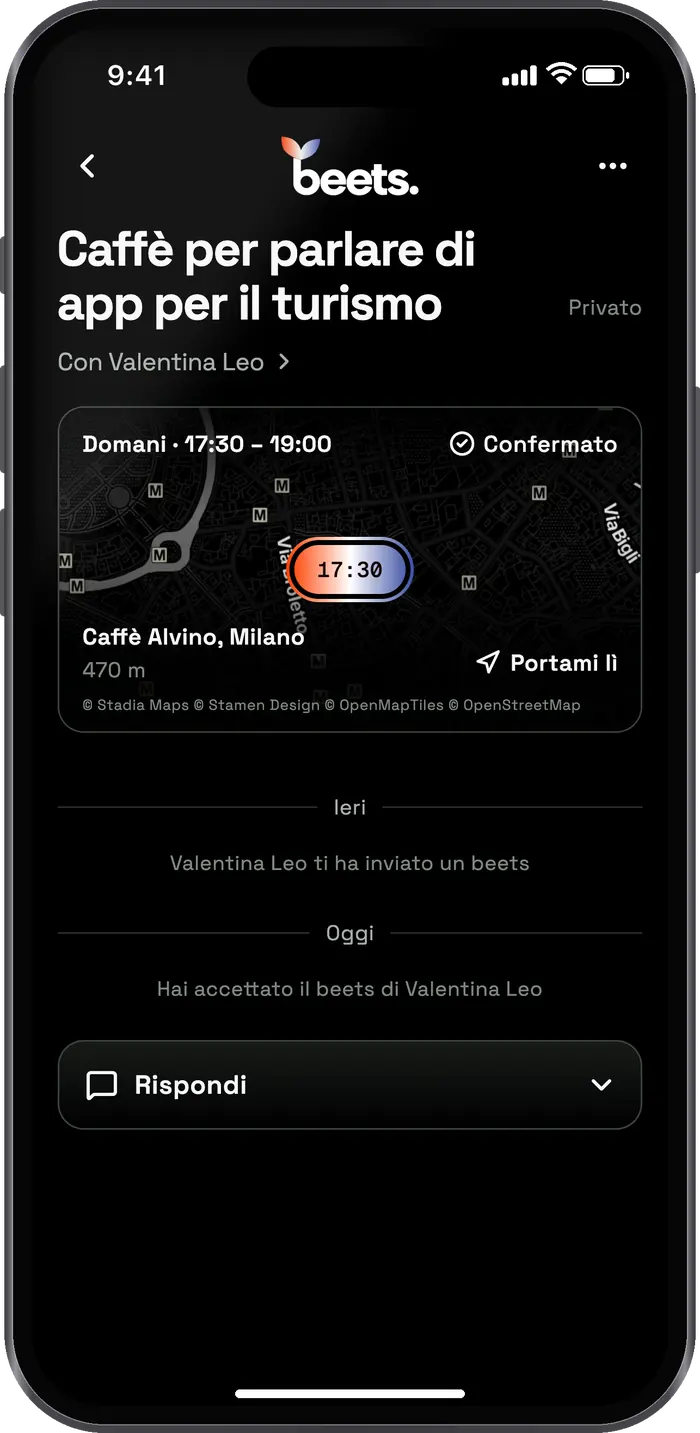
Choose a day, time and place. They can accept, suggest a change or decline.
- Day
- Thu 24
- Time
- 18:30
- Place
- Caffè Alvino
Go to the agreed place and talk about work, ideas and collaborations.
From the map to an in-person meeting.
With beets you find professionals nearby, check their profiles and arrange a meeting.
Find professionals nearby
Explore the map and see what people do, their role, skills and interests.
Check the profile
See whether you share interests or professional goals.
Send a beets
Choose a day, time and place. They can accept or suggest a change.
Meet in person
One-to-one, or at a group meetup of 2 to 12 people.
Get the app ↗From app to meeting.
In three steps.
Every beets starts from a professional profile and includes a day, time and place.
A professional meeting
Check the profile.
See what they do, which skills they have and what they are interested in.
Send a beets.
Choose a day, time and place: a café, a coworking space, a square.
Get the answer in the app.
They can accept, suggest a change or decline. The confirmed details stay in the app.
Skills · Industries · Goals
Your beets
- Day
- Choose a day
- Time
- Choose a time
- Place
- A public place
One-to-one or in a group. Always in person.
Get to know
other professionals.
Every profile shows what people do, their role, skills, experience and interests. If you have something in common, send a beets.
interest.
Compare work, skills, goals and interests before you send a beets.
Get the appFind professionals by
industry and interests.
On beets you meet people working in tech, design, marketing, product, travel, food and business.
Start from what
you want to do.
Whether you already have someone in mind or want to grow your network, beets has a way to do it in person.
I'd like to meet that person.
Send a beets: pick a day, time and place, and they answer you in the app.
Send a beets
I'd like to meet people in my field.
Join a group meetup on a topic, from 2 to 12 people, or start your own.
Explore meetups
I'd like people to find me.
Complete your profile and tap “Show me” on the map: people nearby can send you a beets.
Create your profile
Plan the meeting
Day, time and place in a single request.
When you send a beets you choose a day, time and a public place. They can accept or suggest a change. The confirmed details stay in the app.
- 01 / Profile
- Choose who you want to meet
- 02 / Beets
- Suggest a day, time and place
- 03 / Answer
- Get a confirmation or a change
9.1881° E
All confirmed in the app. Now you can meet in person.
Professionals nearby
Meet professionals
near you.
Check profiles, see what you have in common and choose who you want to meet in person.
Questions,
answered
Who can use beets?
Anyone aged 18 or over who wants to meet other professionals in person. On the map you find meetups and people near you, and you can filter by industry.
Are meetings always in person?
Yes. beets helps you find the right people and arrange the meeting: the meeting itself happens face to face, at an agreed place.
Is beets free?
Yes. Profiles, beets and group meetups are free. There are no ads in the app and beets doesn't sell your data. At the café, everyone pays for their own coffee.
How do I send a beets?
Open their profile, choose a day, time and place and send it. They can accept, suggest another time or place, or decline. If they accept, the meeting shows up in your upcoming meetups.
How do group meetups work?
Anyone can start a meetup on a professional topic, for 2 to 12 people. Before joining you can read the details and see who's already in.
Who can see where I am?
Nobody, until you tap "Show me" on the map, and even then your location is rounded. "On my way" shares it only with people at the same meetup, shortly before it starts, and it stops by itself.
Do I need an account to try it?
Not to look at the map and meetups. To join, send a beets or follow someone, yes: sign in with email, Apple, Google or LinkedIn.
Let's stay
in touch
Got a question for us?
Email us · hello@beetsmeeting.com

Two skill sets.
One direction.
Salvatore Casalino
Co-founder · CTO
Designs and builds beets, from the app architecture to the mobile experience.
Natale Tornatora
Co-founder · CMO
Leads strategy, artificial intelligence, marketing and brand growth.